Installation
Meta Package Manager is distributed on PyPI.
So you can install the latest stable release with uv:
$ uv tool install meta-package-manager
Danger
Misleading package name

There is a mpm Python module on PyPI that has nothing to do with this project. Avoid it!
The real package is named meta-package-manager. Only the latter provides the mpm CLI you’re looking for.
Try it now
You can try Meta Package Manager right now in your terminal, without installing any dependency or virtual env thanks to uvx:
$ uvx meta-package-manager
Installed 14 packages in 29ms
Usage: mpm [OPTIONS] COMMAND [ARGS]...
$ uvx [email protected]
Installed 14 packages in 29ms
Usage: mpm [OPTIONS] COMMAND [ARGS]...
$ uvx --from git+https://github.com/kdeldycke/meta-package-manager -- mpm
$ uvx --from file:///Users/me/code/meta-package-manager -- mpm
This will download meta-package-manager (the package), and run mpm, the CLI included in the package.
Try the library
You can also try the library itself in an interactive Python shell without installing anything on your system:
$ uvx --with meta-package-manager python
Installed 14 packages in 29ms
Python 3.13.2 (main, Feb  4 2025, 14:51:09) [Clang 16.0.0 (clang-1600.0.26.6)] on darwin
Type "help", "copyright", "credits" or "license" for more information.
>>> from meta_package_manager.pool import pool
>>> list(pool['brew'].installed)
[...]
>>>
Installation methods
mpm is available on several popular package managers:
Easiest way is to install uv, then install meta-package-manager system-wide with the uv tool command:
$ uv tool install meta-package-manager
Then you can run mpm directly:
$ mpm --version
To use mpm as a library in your project instead:
$ uv add meta-package-manager
You can install the latest stable release and its dependencies with a simple pip call:
$ python -m pip install meta-package-manager
Other variations includes:
$ pip install meta-package-manager
$ pip3 install meta-package-manager
If you have difficulties to use pip, see
pip’s own installation instructions.
pipx is a great way to install Python applications globally:
$ pipx install meta-package-manager
Meta Package Manager is available as a Homebrew formula, bottled for macOS and Linux, so you just need to:
$ brew install meta-package-manager
ZeroBrew is a fast, Homebrew-compatible package manager written in Rust. It consumes the same formula as Homebrew, so on Linux and macOS you just need to:
$ zb install meta-package-manager
Meta Package Manager is available on MacPorts, so you just need to:
$ sudo port install meta-package-manager
Tip
The port landed in MacPorts on 2026-07-22. If port install cannot find it yet, refresh your ports tree first with sudo port sync.
You can also install it from the Portfile overlay maintained in the repository.
Meta Package Manager is available in the main repository of Scoop, so you just need to:
> scoop install main/meta-package-manager
Build and install from the nuspec maintained in the repository:
> git clone https://github.com/kdeldycke/meta-package-manager.git
> cd meta-package-manager\packaging\choco\meta-package-manager
> choco pack
> choco install meta-package-manager --source .
Help unblock the community-repository submission
The build above is the only supported route: submission 6.4.2 was rejected over antivirus false positives on the bundled Windows binary.
You can help move it forward by reporting the detection to your antivirus vendor, the only practical path back to a community-repository submission.
Build and install from the definition maintained in the repository:
$ git clone https://github.com/kdeldycke/meta-package-manager.git
$ nix-env -f ./meta-package-manager/packaging/nix -i
On flake-enabled systems, you can run it without installing:
$ nix run github:kdeldycke/meta-package-manager?dir=packaging/nix -- --version
Help land it in nixpkgs
The nixpkgs package is pending review at NixOS/nixpkgs#506145. Once merged, installation will be a one-liner:
$ nix-env --install --attr nixpkgs.meta-package-manager
You can help move it forward by showing your support on the pull request.
Meta Package Manager is available in GNU Guix, so you just need to:
$ guix install meta-package-manager
Tip
The package landed in Guix on 2026-06-28. If guix install cannot find it yet, refresh your channels first with guix pull.
To build the bleeding-edge version instead, install from the definition maintained in the repository.
Build and install from the APKBUILD overlay maintained in the repository, as a member of the abuild group with a signing key set up. It targets Alpine edge, the only branch shipping mpm’s build backend:
$ doas apk add alpine-sdk
$ abuild-keygen --append --install -n
$ git clone https://github.com/kdeldycke/meta-package-manager.git
$ cd ./meta-package-manager/packaging/alpine
$ abuild -C ./py3-cloup -r
$ abuild -C ./py3-extra-platforms -r
$ abuild -C ./py3-packageurl -r
$ abuild -C ./py3-click-extra -r
$ abuild -C ./meta-package-manager -r
$ doas apk add --repository ~/.local/share/abuild/alpine meta-package-manager
The 4 intermediate abuild runs produce the dependency packages missing from the official aports tree.
Help land it in aports
The package is pending review at alpine/aports!105566. Once merged, installation will be a one-liner:
$ apk add meta-package-manager
You can help move it forward by showing your support on the merge request.
On Tumbleweed, add the repository the packaging spec builds in and install from it:
$ sudo zypper addrepo https://download.opensuse.org/repositories/home:/kdeldycke/openSUSE_Tumbleweed/home:kdeldycke.repo
$ sudo zypper --gpg-auto-import-keys refresh
$ sudo zypper install meta-package-manager
Every dependency comes from Tumbleweed itself.
Help land it in openSUSE Factory
The repository above is a personal project on the Open Build Service. The package is being prepared for submission to system:packagemanager, the development project through which it would reach Tumbleweed and then Leap. Once accepted, it installs from the distribution’s own repositories:
$ sudo zypper install meta-package-manager
Install from my PPA, on Ubuntu 22.04 and later:
$ sudo add-apt-repository ppa:kdeldycke/mpm
$ sudo apt install meta-package-manager
add-apt-repository comes from software-properties-common, which the desktop and server images carry. The package brings its own Python dependencies, so it installs no Python library system-wide and upgrades none of the ones already there.
Why a PPA rather than the Ubuntu archive
Ubuntu ships neither click-extra nor extra-platforms, and its python3-click and python3-deepmerge are older than click-extra accepts on every series up to and including 26.04, so no package built against the archive could work. The packaging page covers that trade-off, and how to build the source package by hand.
Help land it in deb-get
Support for deb-get is pending review at wimpysworld/deb-get#2036. Once merged, deb-get adds the PPA and installs the package in one step:
$ deb-get install meta-package-manager
You can help move it forward by showing your support on the pull request.
Build and install from the templates of void-linux/void-packages#60532, which GitHub serves under the ref of that pull request:
$ git init ./void-packages
$ cd ./void-packages
$ git fetch --depth 1 https://github.com/void-linux/void-packages.git pull/60532/head:mpm
$ git checkout mpm
$ ./xbps-src binary-bootstrap
$ ./xbps-src pkg mpm
$ sudo xbps-install --repository=./hostdir/binpkgs/mpm mpm
The pkg step cascades through the five new Python packages the pull request introduces, plus an in-place bump of python3-boltons from 20.2.1 to 25.0.0, as detailed on the packaging page.
Void Linux needs a contributor
Void does not accept a package submitted by the author of the software, so I cannot land mpm in void-packages myself. void-linux/void-packages#60532 was closed for that reason.
The templates above are complete: they build on a current Void host, and every dependency passes its test suite there. If you run Void and use mpm, you are welcome to take them and submit them under your own name. They are then yours: put yourself in the maintainer field. Void asks that submitters have a history of contributions to void-packages, so working on orphaned packages first is the recommended route.
Once a package lands, installation becomes a one-liner:
$ xbps-install --sync mpm
An mpm package is available on AUR and can be installed with any AUR helper:
$ yay -S meta-package-manager
$ paru -S meta-package-manager
$ pacaur -S meta-package-manager
Stew installs pre-compiled binaries from GitHub Releases:
$ stew install kdeldycke/meta-package-manager
Binaries
Binaries are compiled at each release, so you can skip the installation process above and download the standalone executables directly.
This is the preferred way of testing mpm without polluting your machine. They also offer the possibility of running the CLI on older systems not supporting the minimal Python version required by mpm.
Platform |
|
|
|---|---|---|
Linux |
||
macOS |
||
Windows |
All links above points to the latest released version of mpm.
See also
To test previous versions for regression, compatibility or general troubleshooting, the old binaries are attached as assets to past releases on GitHub.
To test the bleeding-edge version, fresh binaries are compiled from every push to the
mainbranch: grab them from the development builds.The exact executable format each binary targets is listed in the ABI targets section of the catalog.
Important
Antivirus false positives
The Windows binaries (and to a lesser extent the macOS ARM64 ones, plus anything downstream that bundles them like the Chocolatey package) are flagged by heuristic and ML-based antivirus engines. These are false positives caused by the Nuitka --onefile packaging pattern, not by anything mpm does. Engineering background, per-release detection data, and long-term mitigations are documented on the binaries catalog.
If your antivirus quarantines an mpm binary:
Verify the binary you downloaded with the attestation procedure below. It cryptographically proves the artifact came from this repository’s release pipeline.
Submit a false-positive report to your antivirus vendor with the verified binary. The priority vendor list on the binaries catalog covers the engines responsible for most detections, and VirusTotal’s vendor directory covers the rest.
The more independent reports a vendor receives, the more likely a detection gets reclassified, and that is the only practical path back to a working Chocolatey community-repository submission.
Release verification
All release artifacts (Python packages and compiled binaries) are signed with GitHub Artifact Attestations providing SLSA v1 provenance. You can verify any downloaded artifact with the GitHub CLI:
$ gh attestation verify ./meta-package-manager-8.1.1-macos-arm64.bin --repo kdeldycke/meta-package-manager --signer-repo kdeldycke/repomatic
Loaded digest sha256:... for file://meta-package-manager-8.1.1-macos-arm64.bin
Loaded 1 attestation from GitHub API
✓ Verification succeeded!
Important
The --signer-repo kdeldycke/repomatic flag is required because the release workflow runs as a reusable workflow from kdeldycke/repomatic. The signing certificate references that repository, not kdeldycke/meta-package-manager. Without this flag, verification fails.
For Python packages from PyPI:
$ gh attestation verify ./meta_package_manager-8.1.1-py3-none-any.whl --repo kdeldycke/meta-package-manager --signer-repo kdeldycke/repomatic
Attestation bundles are also attached to each GitHub release for offline verification.
Self-bootstrapping
In a funny twist, mpm can be installed with itself.

Which means there is a way to bootstrap its deployment on an unknown system. Just download the binary corresponding to your platform and architecture:
$ curl --fail --remote-name https://github.com/kdeldycke/meta-package-manager/releases/latest/download/meta-package-manager-macos-x64.bin
################################################### 100.0%
$ file ./meta-package-manager-macos-x64.bin
./meta-package-manager-macos-x64.bin: Mach-O 64-bit executable x86_64
$ chmod +x ./meta-package-manager-macos-x64.bin
$ ./meta-package-manager-macos-x64.bin --version
mpm, version 8.1.1
Then let mpm discovers which package managers are available on your machine and choose the one providing a path to mpm installation:
$ ./meta-package-manager-macos-x64.bin install meta-package-manager
warning: Skip unavailable cargo manager.
warning: Skip unavailable steamcmd manager.
Installation priority: brew > cask > composer > gem > mas > npm > pip > pipx > vscode > yarn
warning: No meta-package-manager package found on brew.
warning: No meta-package-manager package found on cask.
warning: No meta-package-manager package found on composer.
warning: No meta-package-manager package found on gem.
warning: No meta-package-manager package found on mas.
warning: No meta-package-manager package found on npm.
warning: pip does not implement search operation.
meta-package-manager existence unconfirmed, try to directly install it...
Install meta-package-manager package with pip...
Collecting meta-package-manager
  Downloading meta_package_manager-8.1.1-py3-none-any.whl (875 kB)
     ━━━━━━━━━━━━━━━━━━━━━━━━━━━━━━━━━━━━━━━━ 875.1/875.1 kB 494.7 kB/s eta 0:00:00
(...)
Installing collected packages: (...) meta-package-manager
Successfully installed (...) meta-package-manager-8.1.1
And now you can remove the local binary and enjoy the system-wide mpm that was installed by itself:
$ rm -f ./meta-package-manager-macos-x64.bin
$ which mpm
/opt/homebrew/bin/mpm
$ mpm --version
mpm, version 8.1.1
Tip
At this moment, mpm can be installed with itself via these managers:
$ mpm --brew install meta-package-manager
$ mpm --guix install meta-package-manager
$ sudo mpm --macports install meta-package-manager
$ mpm --pacaur install meta-package-manager
$ mpm --pacman install meta-package-manager
$ mpm --paru install meta-package-manager
> mpm --choco install meta-package-manager
$ mpm --pip install meta-package-manager
$ mpm --pipx install meta-package-manager
> mpm --scoop install meta-package-manager
$ mpm --stew install kdeldycke/meta-package-manager
$ mpm --uvx install meta-package-manager
$ mpm --yay install meta-package-manager
$ mpm --zerobrew install meta-package-manager
Python module usage
Meta Package Manager should now be available system-wide. On a color terminal wide enough for it, --version draws the brand mark beside what this install is: its version, the interpreter running it, the platform, and how many of the managers it implements are usable here.
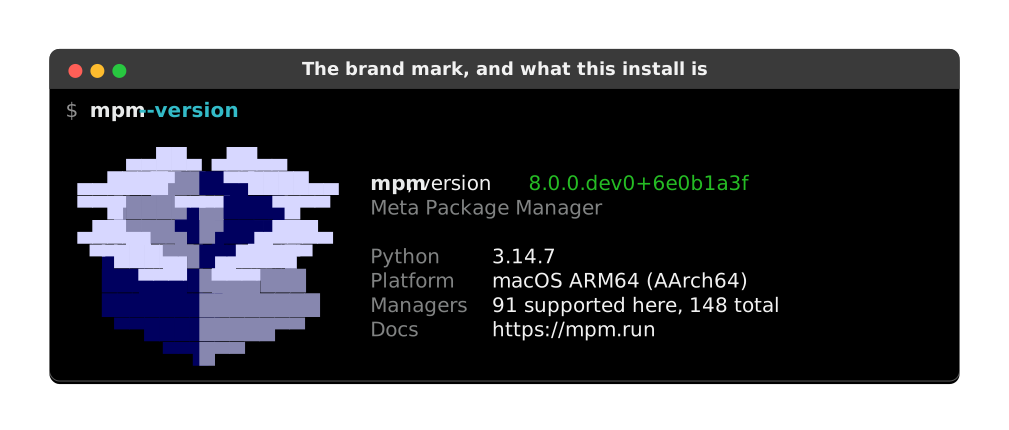
Anywhere else, and in a pipe, it prints the same facts as two plain lines:
$ mpm --version
mpm, version 8.1.1
Python 3.14.7, macOS ARM64 (AArch64)
If the command is not found, you can directly execute the module from Python:
$ python -m meta_package_manager --version
Python compatibility
The table below shows which Python versions each mpm release range supports. For 5.17.0 and later, support comes from the Programming Language :: Python :: 3.X classifiers in pyproject.toml. For earlier releases, the floor comes from the requires-python (or Poetry python = "..." for older tags) or python_requires (setup.py) declaration, capped at the latest Python released within the range. Releases before 1.8.0 did not declare Python version support and are not represented. Cells carry three states: ✅ for a version the release declares, ❌ for one its requires-python rules out, and – for one it neither claimed nor forbade, which is mostly a Python that did not exist yet when the release was cut. The table is regenerated from the release tags by repomatic’s update-docs job, through click-extra’s matrix mechanism:
|
|
|
|
|
|
|
|
|
|
|
|
|
|
|
|---|---|---|---|---|---|---|---|---|---|---|---|---|---|---|
|
✅ |
✅ |
✅ |
✅ |
✅ |
✅ |
❌ |
❌ |
❌ |
❌ |
❌ |
❌ |
❌ |
❌ |
|
– |
✅ |
✅ |
✅ |
✅ |
✅ |
❌ |
❌ |
❌ |
❌ |
❌ |
❌ |
❌ |
❌ |
|
– |
– |
✅ |
✅ |
✅ |
❌ |
❌ |
❌ |
❌ |
❌ |
❌ |
❌ |
❌ |
❌ |
|
– |
– |
✅ |
✅ |
✅ |
✅ |
❌ |
❌ |
❌ |
❌ |
❌ |
❌ |
❌ |
❌ |
|
– |
– |
– |
✅ |
✅ |
✅ |
✅ |
❌ |
❌ |
❌ |
❌ |
❌ |
❌ |
❌ |
|
– |
– |
– |
✅ |
✅ |
✅ |
✅ |
✅ |
❌ |
❌ |
❌ |
❌ |
❌ |
❌ |
|
– |
– |
– |
✅ |
✅ |
✅ |
✅ |
✅ |
✅ |
❌ |
❌ |
❌ |
❌ |
❌ |
|
– |
– |
– |
– |
– |
– |
– |
✅ |
✅ |
✅ |
❌ |
❌ |
❌ |
❌ |
|
– |
– |
– |
– |
– |
– |
– |
✅ |
✅ |
✅ |
✅ |
✅ |
❌ |
✅ |
|
– |
– |
– |
– |
– |
– |
– |
– |
– |
✅ |
✅ |
✅ |
✅ |
✅ |
|
– |
– |
– |
– |
– |
– |
– |
– |
– |
– |
✅ |
✅ |
✅ |
✅ |
Shell completion
Completion for popular shell rely on Click feature.
Add this to ~/.bashrc:
eval "$(_MPM_COMPLETE=bash_source mpm)"
Add this to ~/.zshrc:
eval "$(_MPM_COMPLETE=zsh_source mpm)"
Add this to ~/.config/fish/completions/mpm.fish:
eval (env _MPM_COMPLETE=fish_source mpm)
Alternatively, export the generated completion code as a static script to be executed:
$ _MPM_COMPLETE=bash_source mpm > ~/.mpm-complete.bash
Then source it from ~/.bashrc:
. ~/.mpm-complete.bash
$ _MPM_COMPLETE=zsh_source mpm > ~/.mpm-complete.zsh
Then source it from ~/.zshrc:
. ~/.mpm-complete.zsh
_MPM_COMPLETE=fish_source mpm > ~/.config/fish/completions/mpm.fish
For broader shell coverage than Click’s Bash, Zsh and Fish support, mpm’s command tree can be exported to Carapace, a multi-shell completion engine that drives identical completions across Bash, Zsh, Fish, Nushell, PowerShell, Elvish and more from a single spec. Generate and install the spec with click-extra’s wrap command:
$ uvx --from "click-extra[carapace]" --with meta-package-manager click-extra wrap --help-format carapace --install meta_package_manager.cli:mpm
This writes the spec to ~/.config/carapace/specs/mpm.yaml, which Carapace loads once it is installed and hooked into your shell. Re-run the command after upgrading mpm to refresh the spec.
Man pages
mpm exposes a --man option on every (sub)command, which typesets the corresponding manual and pages it, the way man does:
$ mpm --man
$ mpm install --man
To get the roff source instead, ask for the man rendering of --help-format:
$ mpm --help-format man
The full command tree is also pre-rendered as static .1 files:
Bundled as
mpm-manpages.tar.gzon every GitHub release. Download, extract, and copy to${MANPATH%%:*}/man1/(typically/usr/local/share/man/man1/).Rendered as browser-viewable HTML siblings under https://mpm.run/man/, which indexes the whole set.
Downstream packagers can regenerate them from source as part of their build phase:
$ click-extra wrap --help-format man --output-dir /usr/share/man/man1/ meta_package_manager.cli:mpm
The module:function notation skips the mpm console-script entry point (which dispatches through __main__:main and hides the Click command behind a lazy import). The generator honors SOURCE_DATE_EPOCH for reproducible builds. See the click-extra man-page reference for other invocation forms (uvx for build sandboxes, .py file paths, and the programmatic API).
Extra dependencies
By default, mpm supports TOML configuration files and all standard table formats. Optional extras unlock additional configuration file formats, table output formats, and SBOM generation:
Extra |
Install command |
Unlocks |
|---|---|---|
|
$ uv pip install meta-package-manager[hjson]
|
|
|
$ uv pip install meta-package-manager[json5]
|
|
|
$ uv pip install meta-package-manager[jsonc]
|
|
|
$ uv pip install meta-package-manager[sbom-offline]
|
|
|
$ uv pip install meta-package-manager[sbom-online]
|
|
|
$ uv pip install meta-package-manager[toml]
|
|
|
$ uv pip install meta-package-manager[xml]
|
|
|
$ uv pip install meta-package-manager[yaml]
|
|
Tip
Install all extras at once with:
$ uv pip install meta-package-manager[hjson,json5,jsonc,sbom-offline,sbom-online,toml,xml,yaml]
Or with pip:
$ pip install meta-package-manager[hjson,json5,jsonc,sbom-offline,sbom-online,toml,xml,yaml]
When working from a cloned repository, uv sync installs all runtime extras plus dev groups (test, docs, typing) in one shot:
$ uv sync --all-extras --all-groups