GNOME Shell extension
The Meta Package Manager project maintains a GNOME Shell extension.
A top bar indicator lists the outdated packages reported by mpm outdated across every package manager on the system, and lets you upgrade them one by one or per manager. The mpm CLI is installed separately: see Installation.
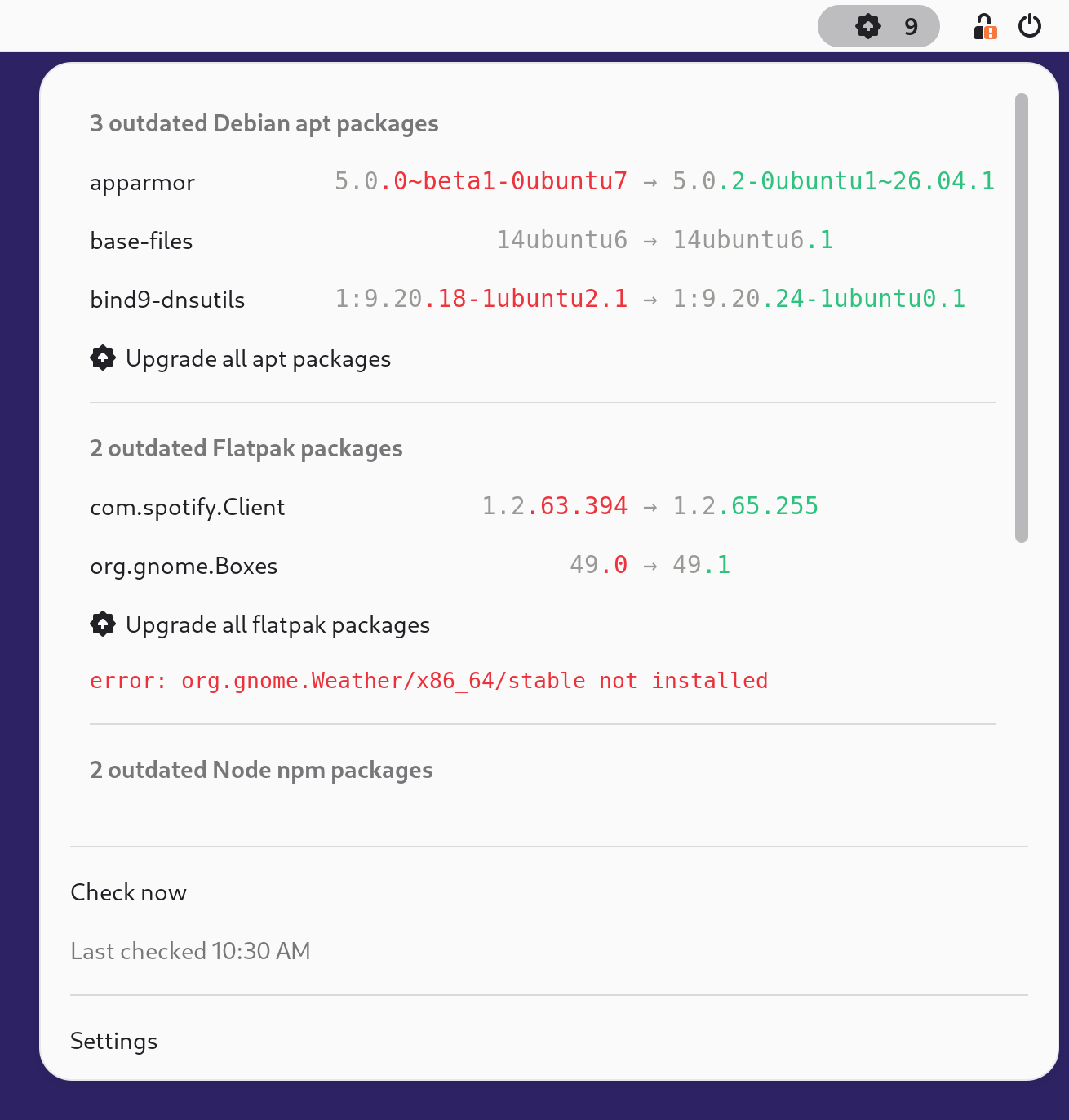
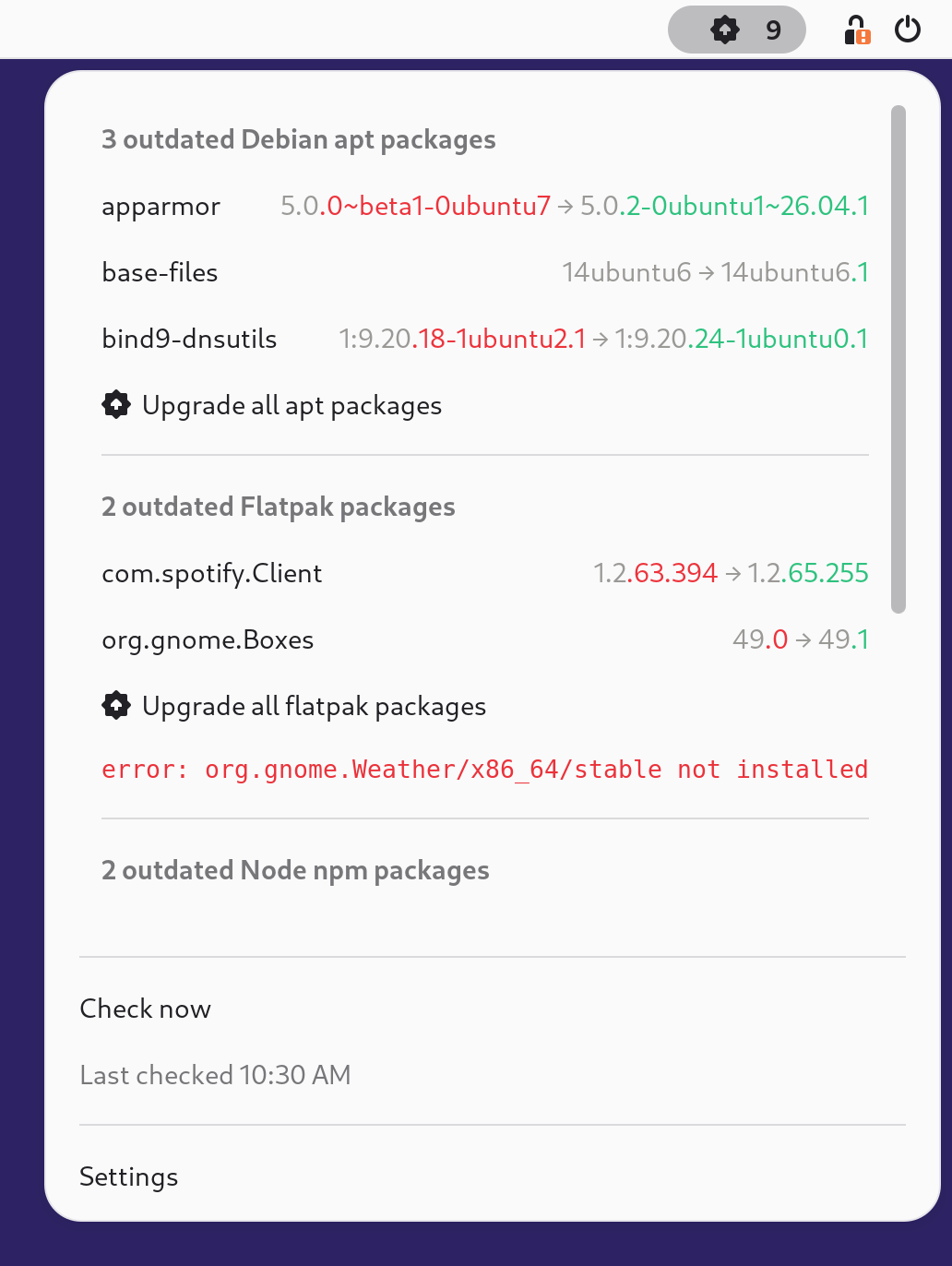
Each outdated package carries its version diff colored with the same convention as mpm outdated: unchanged prefix in gray, installed-version suffix in red, latest-version suffix in green.
The extension looks for mpm on the session PATH, then in well-known locations (~/.local/bin, /usr/local/bin, Linuxbrew), and a custom launcher (like uv run mpm) can be configured in its settings. mpm 6.4.0 or newer is required.
Requirements
GNOME Shell
46to50.The
mpmCLI,6.4.0or newer, reachable from the GNOME session.For upgrades run in a terminal: any of
xdg-terminal-exec, Ptyxis, Console (kgx) or GNOME Terminal, or a custom terminal command set in the extension settings.
Installation
From extensions.gnome.org
The extension is published at extensions.gnome.org/extension/10714/meta-package-manager, for GNOME Shell 46 to 50.
The Install button on that page needs GNOME Shell integration on the host. The site describes it as “two parts: browser extension and native host messaging application”. Most distributions package the second part as gnome-browser-connector. Without both, the button reports the integration as missing.
Two other routes reach the same catalog and need neither part. Extension Manager browses and installs it from a desktop application. gext, one of the managers mpm wraps, installs it from a shell:
$ gext install [email protected]
From a release zip
Every GitHub release carries the packed extension as a mpm-gnome-shell-extension.zip asset, next to the mpm binaries. Its provenance is attested, so you can verify it was built by this project’s release pipeline before installing:
$ gh attestation verify mpm-gnome-shell-extension.zip --repo kdeldycke/meta-package-manager --signer-repo kdeldycke/repomatic
Then install it:
$ gnome-extensions install --force mpm-gnome-shell-extension.zip
Important
A running GNOME Shell does not pick up a freshly installed extension, and gnome-extensions enable asks the shell rather than the disk. Run it too early and it answers Extension "mpm@kdeldycke.github.io" does not exist, however successful the install was. Restart the session first.
A Wayland session cannot restart the shell in place, so end the session and log back in:
$ gnome-session-quit --logout --no-prompt
An X11 session can restart the shell alone, from the Alt+F2 prompt: type r, then Enter.
Once the shell is back, enable the extension:
$ gnome-extensions enable [email protected]
State: ACTIVE confirms the shell loaded it:
$ gnome-extensions info [email protected]
[email protected]
  Name: Meta Package Manager
  (...)
  Enabled: Yes
  State: ACTIVE
Between releases, the bleeding-edge equivalent is produced on each extension change as a workflow artifact of tests-gnome-extension.yaml.
From a source checkout
$ git clone https://github.com/kdeldycke/meta-package-manager.git
$ cd ./meta-package-manager
$ glib-compile-schemas "gnome-shell/[email protected]/schemas/"
$ ln -snf "$(pwd)/gnome-shell/[email protected]" ~/.local/share/gnome-shell/extensions/
Restart the session as above, then enable it:
$ gnome-extensions enable [email protected]
Configuration
Settings live in the extension preferences window, also reachable from the indicator menu:
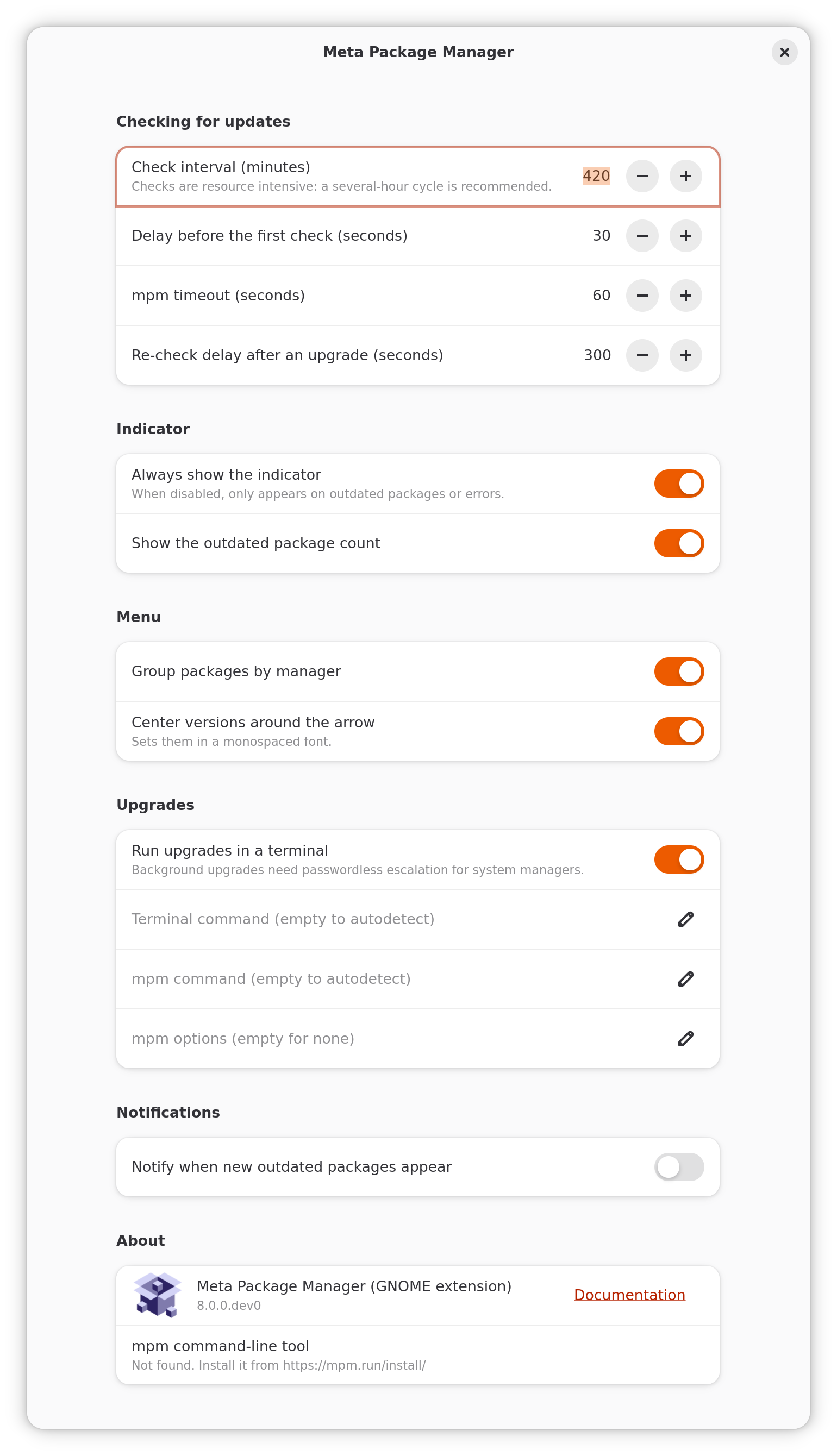
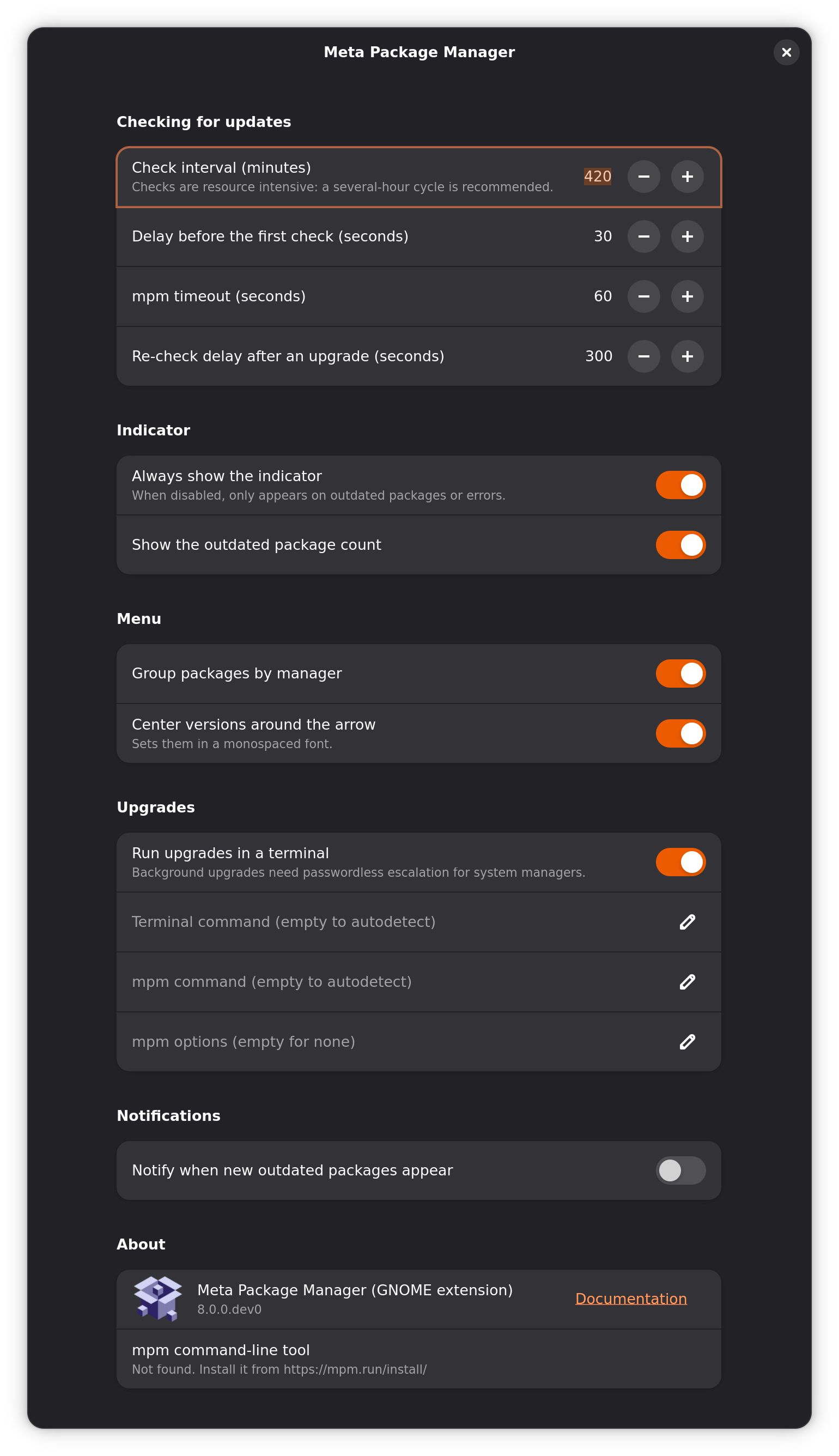
Setting |
Description |
Type |
Default |
|---|---|---|---|
|
Group each manager’s packages into a section of its own. |
Boolean |
|
|
Center each version pair around its arrow, monospaced. |
Boolean |
|
|
Minutes between two package checks. |
Integer |
|
|
Seconds before the first check after login. |
Integer |
|
|
Seconds passed to |
Integer |
|
|
Custom |
String |
Empty |
|
Extra options for every |
String |
Empty |
|
Show the indicator even when everything is up to date. |
Boolean |
|
|
Show the outdated package count next to the icon. |
Boolean |
|
|
Desktop notification when new outdated packages appear. |
Boolean |
|
|
Run upgrades in a terminal window. |
Boolean |
|
|
Custom terminal emulator, empty to autodetect. |
String |
Empty |
|
Seconds before refreshing the list after an upgrade is started. |
Integer |
|
These settings drive the menu layout, the check cadence and how mpm is called: everything else comes from mpm’s own configuration file, which applies to every run the extension triggers. See Configuration for the search paths and the full schema.
mpm-options goes after the extension’s own options, so an option set twice takes the value given here. That includes --verbosity, which the extension sets to CRITICAL to list the outdated packages. A raised level never hides that list: only the exit status of mpm marks a check as failed. A successful check drops what mpm wrote to standard error. An upgrade run in a terminal shows its log there.
The About group at the foot of the window names two versions. The first is the extension’s own, compiled into its metadata.json. The second is the mpm release the extension resolved, with the command that answered it below. The two ship separately, so a bug report needs both.
The PATH the extension sees
GNOME Shell starts the extension with the environment of the session, which the systemd user manager builds from environment.d and, on some distributions, ~/.profile: it never reads .bashrc or .zshrc. A manager installed under the home directory, or a PATH entry exported from those files, is then invisible to mpm, and so is the global bin directory of pnpm, without which pnpm refuses its global commands.
The extension therefore passes --shell-env to any mpm from 8.0.0 on, for the checks and for the upgrade actions alike. mpm runs the login shell once, as an interactive login shell, adopts the environment it exports, and only then looks for managers. The shell has ten seconds to answer, past which mpm keeps the environment it started with. Add --no-shell-env to mpm-options to opt out.
The alternative fixing every desktop program at once is a ~/.config/environment.d/50-path.conf file carrying the PATH line, which systemd reads at login.
Panel icons
State |
Adwaita |
Yaru |
Icon name |
Shown when |
|---|---|---|---|---|
Unknown |
|
|
|
Before the first check of the session. |
Checking |
|
|
|
While a check is running. |
Up to date |
|
|
|
No selected manager reports an upgrade. |
Updates available |
|
|
|
Packages can be upgraded. Also marks each Upgrade all row. |
Error |
|
|
|
A check failed, or no runnable |
Manager failed |
|
|
|
On the sub-menu header of a manager that reported errors. |


Screenshots
Every layout, photographed from a real GNOME session driven by docs/gnome_screenshots_update.py and refreshed by docs-screenshots.yaml whenever the extension changes.
Each one is captured in both shell appearances, so the two are there to be compared rather than picked for you: the shell restyles its menu with the desktop’s light or dark preference, and the version diff has to keep its colors legible on both. The tabs are synchronized, so switching one switches the other.
The report scrolls past a set height instead of growing the menu to the screen, and the flat captures show that as it is: the list stops at its fold, under a scrollbar, and the sections below it are reached with the wheel.
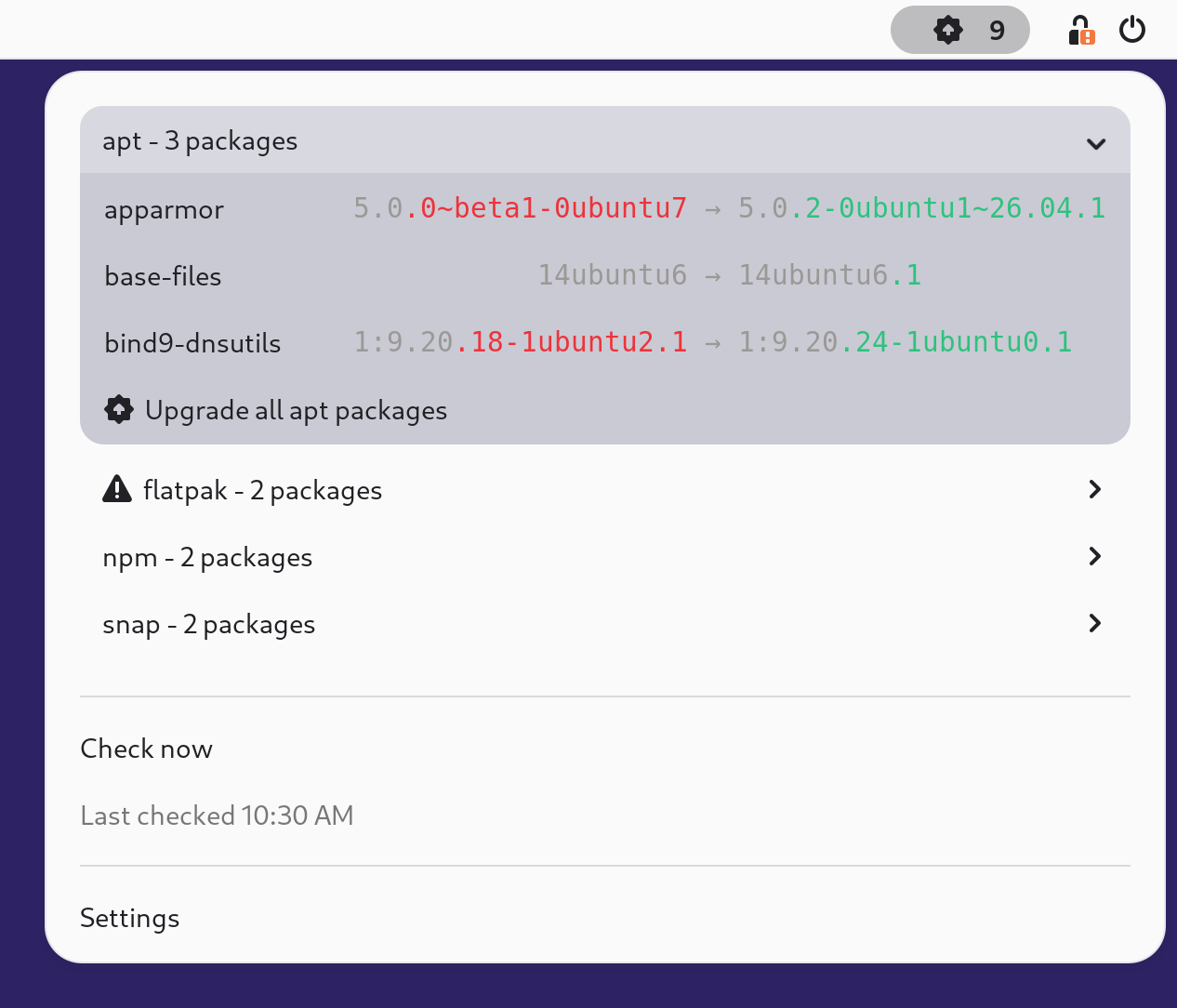
group-by-manager = truealign-columns = true(default)

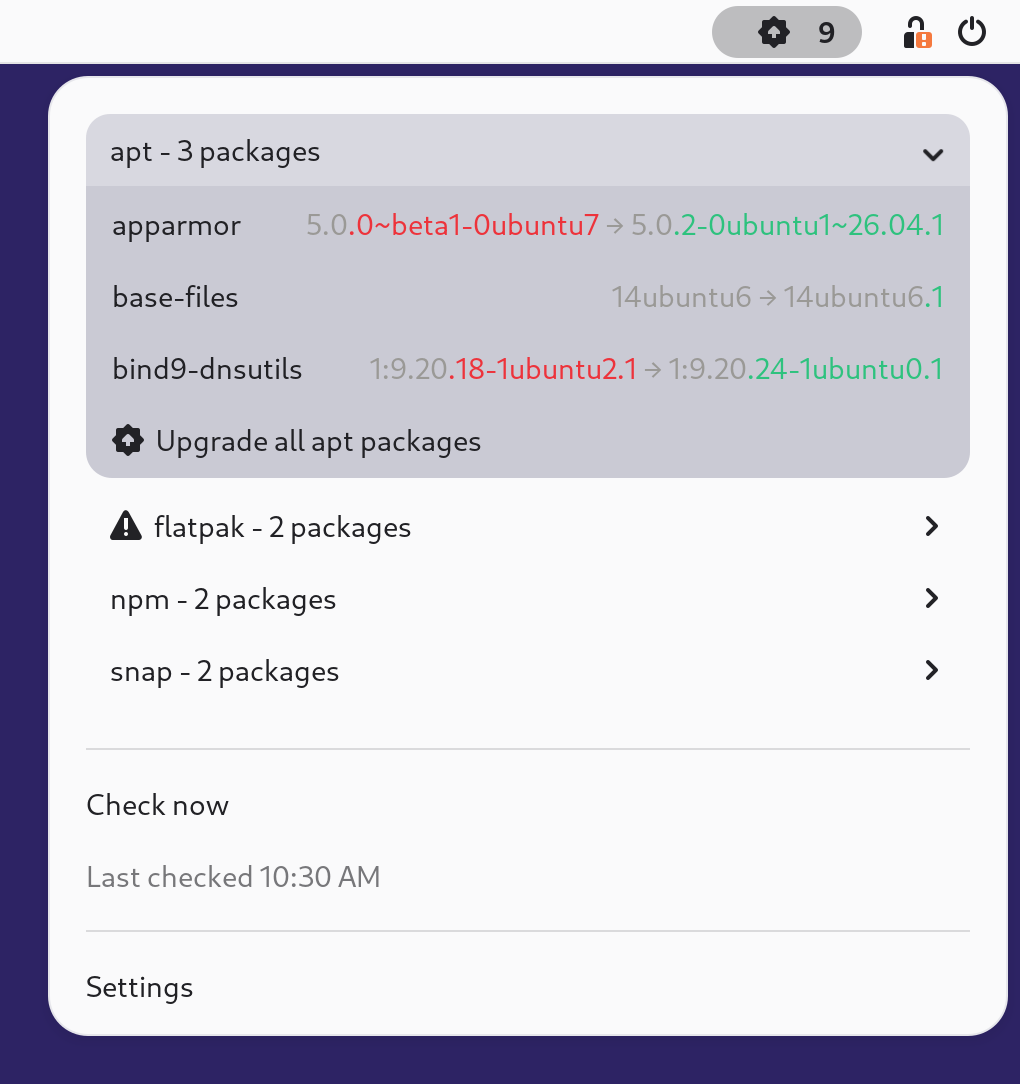
group-by-manager = truealign-columns = false
group-by-manager = falsealign-columns = true
group-by-manager = falsealign-columns = false
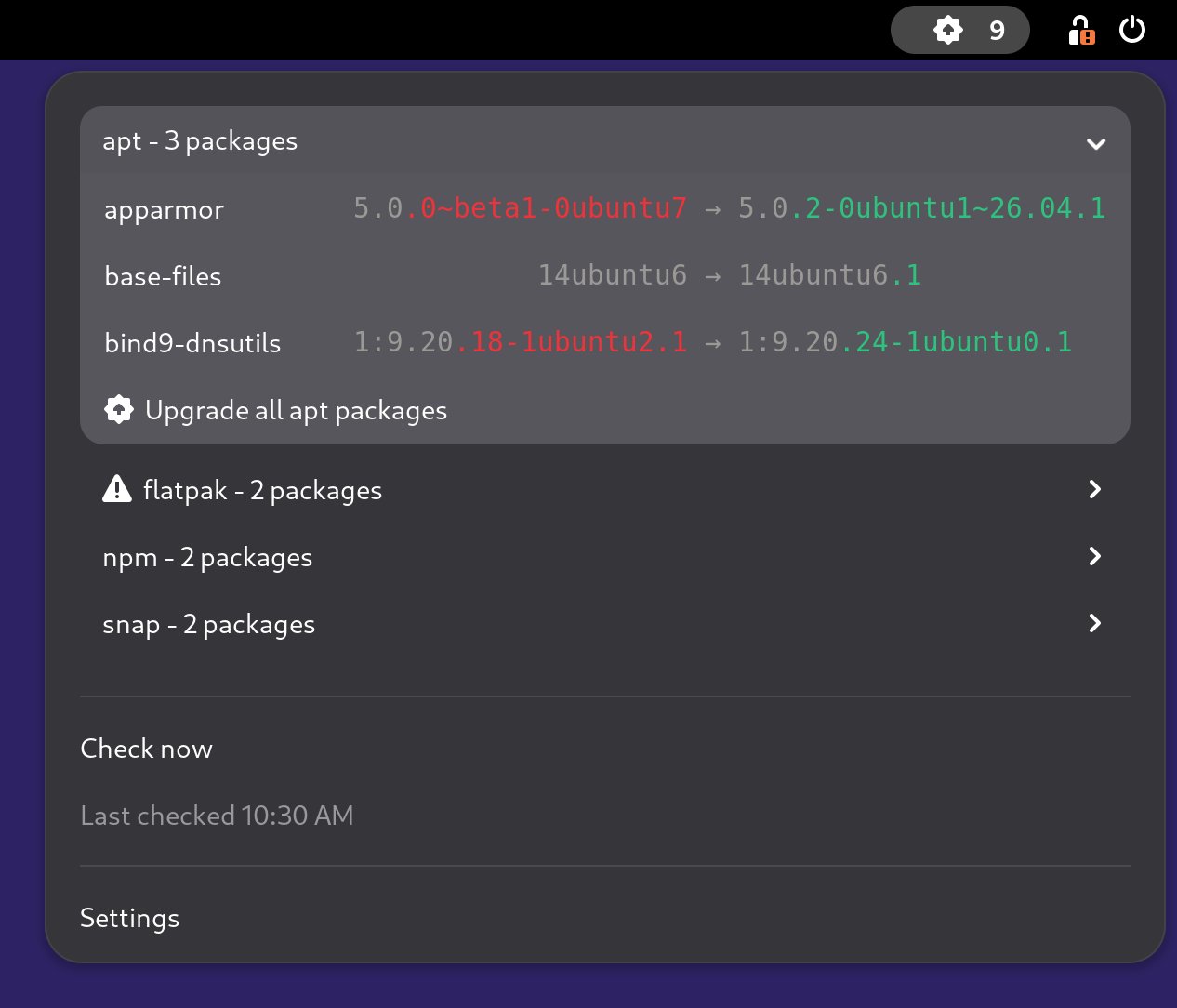
group-by-manager = truealign-columns = true(default)

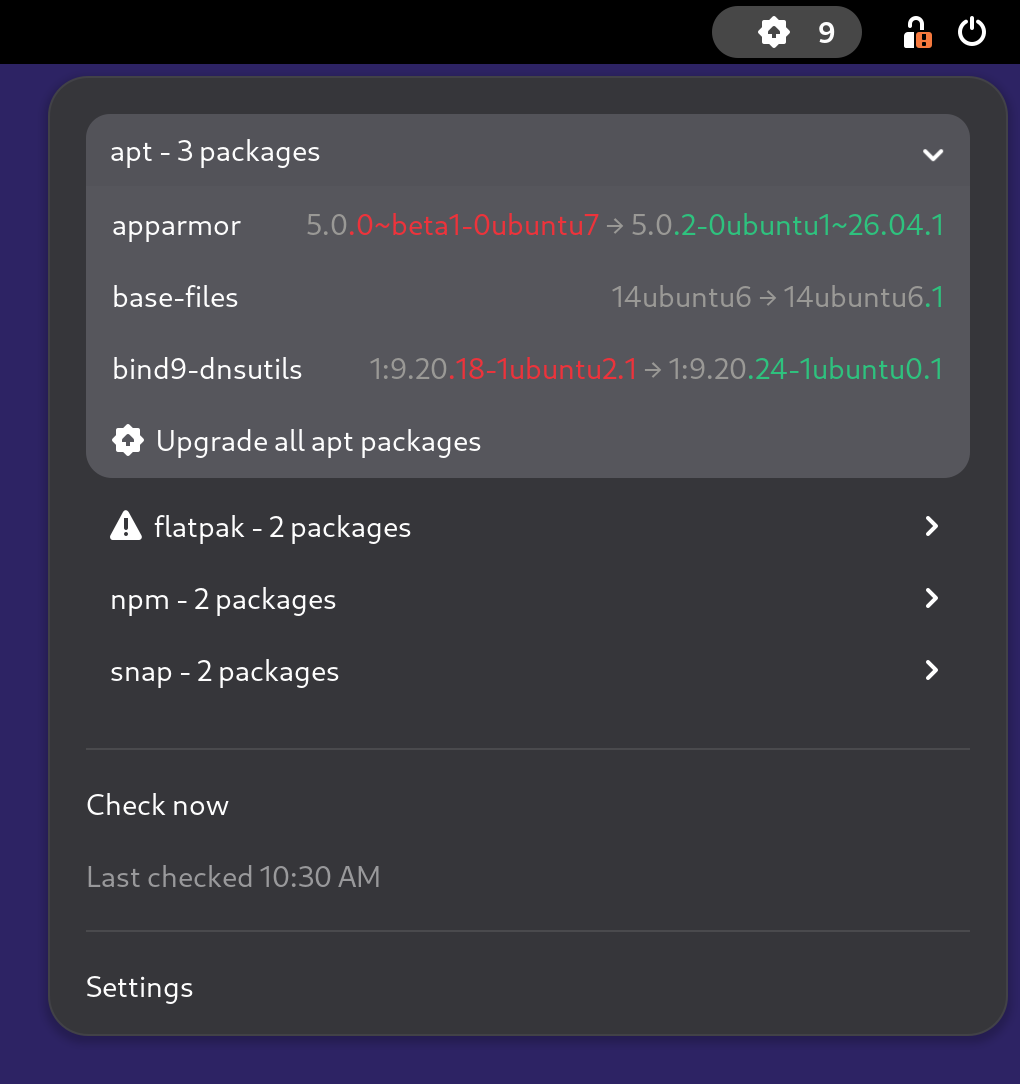
group-by-manager = truealign-columns = false
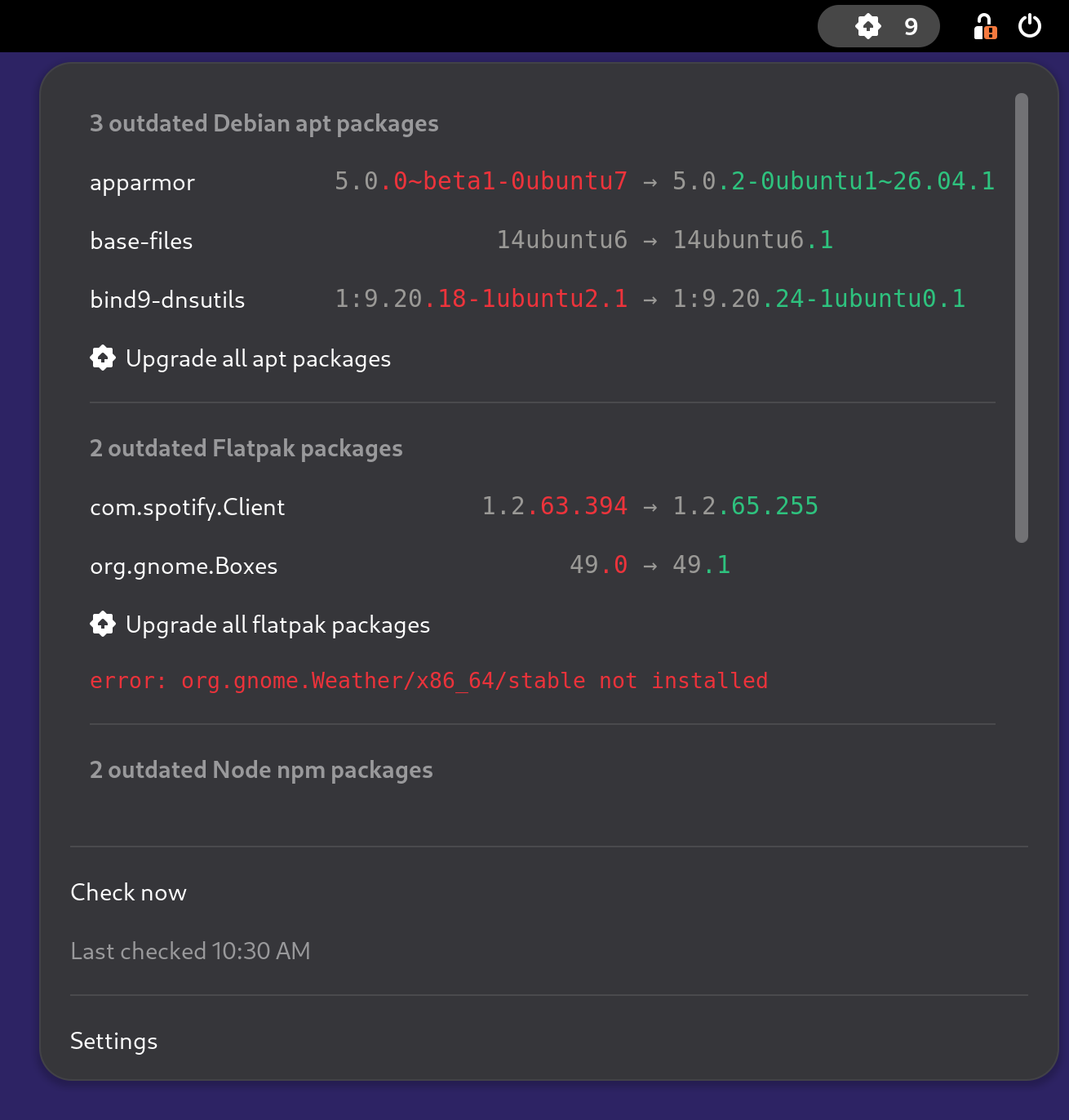
group-by-manager = falsealign-columns = true
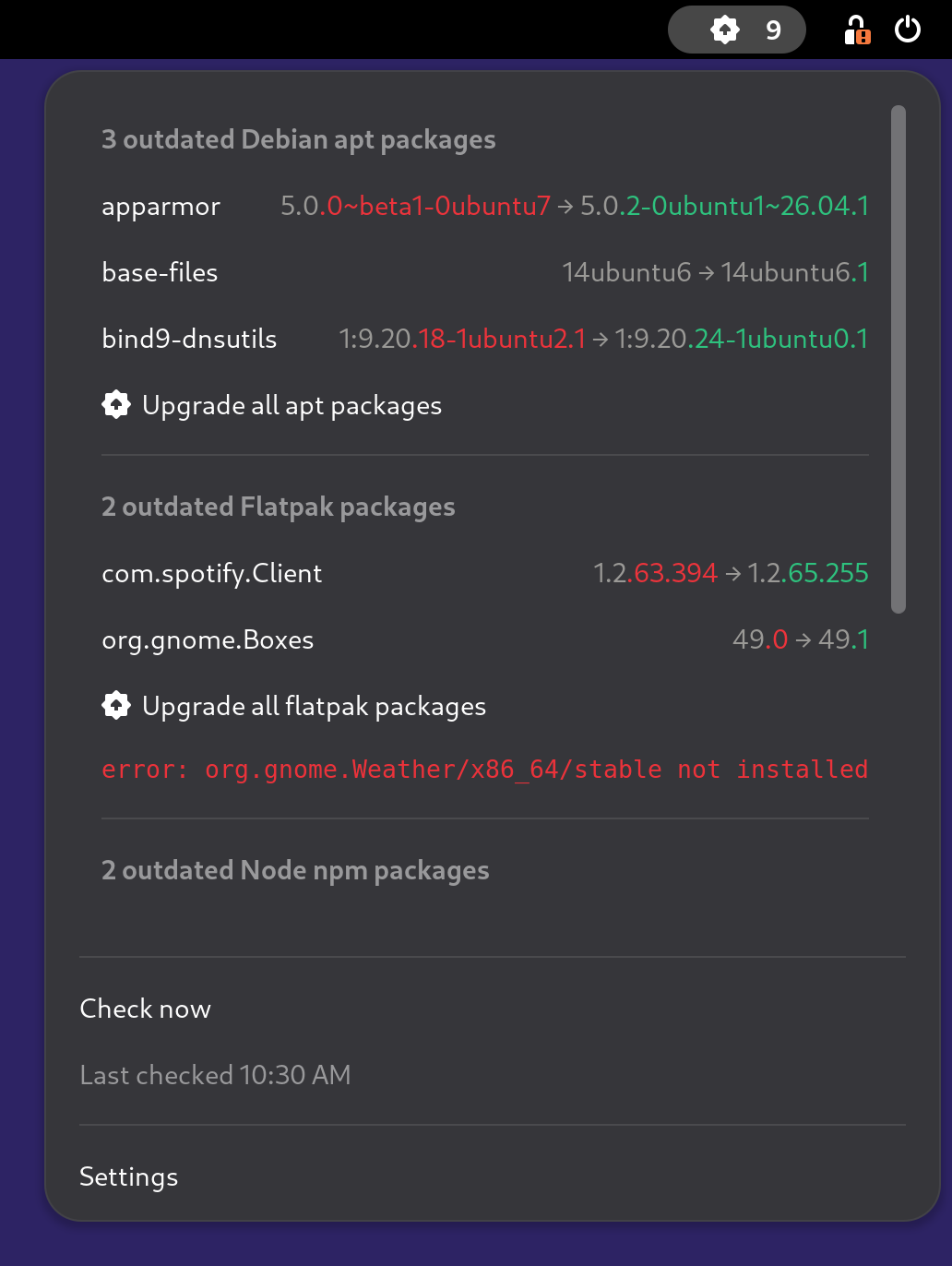
group-by-manager = falsealign-columns = false
Development workflow
The extension lives in the gnome-shell/ directory of the mpm repository and shares its version, release cycle and issue tracker.
Its logic is split in two: extension.js owns the widgetry while mpm.js is shell-free (it never imports resource:///org/gnome/shell/* modules), so the latter runs under a bare gjs interpreter:
$ gjs -m tests/gnome/run-tests.js
ok 1 - parseVersion nominal
(...)
Static invariants (metadata, GSettings schema, stylesheet and icon drift) are enforced by tests/test_gnome_extension.py in the regular Python test suite. The tests-gnome-extension.yaml workflow runs the gjs suite, checks the sources with shexli (the static analyzer extensions.gnome.org applies to every upload), packs the installable zip with gnome-extensions pack, and proves it installs with a gnome-extensions install round-trip.
Todo
Drop the tree-sitter==0.25.2 pin the shexli job carries once the analyzer caps that dependency itself. shexli declares tree-sitter>=0.25.0 with no ceiling, so a fresh install pairs core 0.26.0 with the 0.25.0 grammar, the newest tree-sitter-javascript published, and that pair segfaults on this extension every time. Tracked upstream as Infrastructure/extensions-web#398.
Its eslint job holds the JavaScript to GNOME Shell’s own coding style, with the eslint-config-gnome rules declared by gnome-shell/eslint.config.mjs and pinned to the commit gnome-shell itself pins. No package.json or lockfile is committed: nobody would keep one refreshed, so the ESLint stack floats and a 7-day npm --min-release-age window gates the whole resolved tree, the same supply-chain guard mpm --cooldown applies to the packages mpm installs.
To exercise the extension in a real session, install it from your checkout (see above), then run a nested GNOME Shell so crashes and reloads stay contained:
$ dbus-run-session -- gnome-shell --nested --wayland
Logs are visible with:
$ journalctl --follow --output=cat /usr/bin/gnome-shell
Release process
The extension version is advertised through the version-name field of metadata.json, kept in lockstep with the mpm version by bump-my-version.
If the extension changed between releases, a fresh zip is uploaded to extensions.gnome.org for review. Reviews there are manual and can take a while.
Changelog
8.0.2(2026-09-28)Publish the extension on extensions.gnome.org, for GNOME Shell
46to50.Keep the
syncprogress trail out of the host app’s log, by turning it off on the refresh cycle.
8.0.0(2026-09-20)Breaking: Rename the grouped-layout setting to
VAR_GROUP_BY_MANAGERin the plugin andgroup-by-managerin the extension, fromVAR_SUBMENU_LAYOUTandsubmenu-layout, and turn it on by default. A configuration still using the old name gets the default.Pass
--shell-envtompm8.0.0and newer, so the menu lists the managers installed under the home directory and pnpm’s global packages.Name the package of each upgrade action with a pURL of its manager, so
mpmno longer looks it up in the installed packages first.Offer
uv tool install --upgrade meta-package-managerwhen nompmis found, beside an entry opening the installation page for the systemsuvdoes not answer for.Split a version diff at the same point in both frontends, and highlight only the new token when one version is the other plus a whole token:
14ubuntu6→14ubuntu6.1highlights.1alone.Center the menu’s version pairs around their arrow, mirroring the plugin’s
VAR_ALIGN_COLUMNS, with analign-columnssetting to switch it off.Add an
mpm-optionssetting, extra options spliced into everympmcall the extension makes, and report the resolvedmpmrelease and command in the preferences window.Render every panel state and menu marker with a stock symbolic icon, in place of four bundled SVGs and the 🆙 and ⚠️ emoji, and mark a running check with a refresh icon and a greyed Checking… row.
Render each package row’s version diff as one label instead of five, so a report of a thousand packages scrolls smoothly, and each version as one string, closing the gap that split
5.0.0~beta1-0ubuntu7.Refresh the package list as soon as a background upgrade exits, instead of waiting out the re-check delay.
Scroll the package list with the wheel while a manager’s submenu is expanded, drop the expander arrow from a manager with nothing to report, and drop the blank band shown above Checking… before the first report.
Pack the extension from the commit being released, and bundle the license in it:
v7.6.1shipped a zip advertising7.6.2.dev0as itsversion-name.Mark a package check as failed on the exit code of
mpmonly, so a--verbosityraised in the options no longer replaces the package list with log lines.Fix a
gnome-shellcrash when a setting changed while a manager’s submenu was open in the grouped layout.Fix a check still in flight outliving
disable(), which left a main loop source free to fire on a locked session.Publish the documentation at
https://mpm.run, hosted on Cloudflare Pages. Every link in the readme, the benchmark, the packaging specs and both frontends points at the new origin, and the formerkdeldycke.github.ioURLs redirect to it.Give each frontend page a release history of its own, built from the changelog entries scoped to it, and make each page self-contained: what a click runs, where its settings stop and
mpm’s configuration starts, the version-diff colors.Illustrate the extension’s page with screenshots of its menu in both layouts and both shell appearances, captured from a real headless GNOME session by the new
docs-screenshots.yamlworkflow.Restart the GNOME session before enabling the extension, in the documented installation steps:
gnome-extensions enableasks the running shell rather than the disk.
7.6.0(2026-08-10)Add a GNOME Shell extension (GNOME 46 to 50) mirroring the SwiftBar/Xbar plugin: a top bar indicator lists outdated packages per manager, and every menu action runs
mpmitself. Addresses #809.Attach the packed extension to every GitHub release as an attested
mpm-gnome-shell-extension.zipasset, built withgnome-extensions pack.Lint the extension and its gjs test runner with ESLint against GNOME Shell’s own
eslint-config-gnomeruleset, in a neweslintjob installing the stack behind a 7-daynpm --min-release-agecooldown.